
一年一度的微軟開發人員年度線上盛會來了! Connect現場直播時間是台灣時間的11月16號PM0930開始....
微軟Connect(); 2016 開發人員大會將展示創新的技術以及解決方案,更簡單地設計、
繼 //Build/ 2016開放了機器人聊天應用技術之後,
現場直播是台灣時間11月16日晚上9:30 開始,將會持續提供互動式Q&A和身歷其境的點播內容直到11月
有興趣的可以看一下直播,也別錯過囉!
一年一度的微軟開發人員年度線上盛會來了! Connect現場直播時間是台灣時間的11月16號PM0930開始....
微軟Connect(); 2016 開發人員大會將展示創新的技術以及解決方案,更簡單地設計、
繼 //Build/ 2016開放了機器人聊天應用技術之後,
現場直播是台灣時間11月16日晚上9:30 開始,將會持續提供互動式Q&A和身歷其境的點播內容直到11月
有興趣的可以看一下直播,也別錯過囉!

BIOS的MicroCode版本會一段時間被Intel更新,那要如何update呢?方法如下:(以Baytrail為例)
1. 先找有無新版的MicroCode可以下載,可以從Intel IBL的搜尋輸入關鍵字"MicroCode"
會發現有一堆的資訊,找出符合的CPU type,下載
2. 下載後解壓縮發現裡面的檔案是*.inc檔,但在AMI的VeB找一下發現類似的命名附檔名卻是*.pdb,不是*.inc,想辦法將*.inc轉成*.pdb
裝完WE8S之後通常會伴隨著要不要安裝WEDU,基本上會選擇安裝以安裝新的updates和hotfixs,但在九月初期時的MDSN論壇上有人反應了當Launch WEDU時會有error message, "There was an error communicating with the server please try again later..."的訊息而再也無法下載檔案。這個問題直到上禮拜才被MS解決,方式如下:
1. 如果很單純只開發WES7的話,移除透過WE8S安裝的WEDU,直接安裝WEDU1.2,即可解決。(前提是WEDU1.2跟WE8S互沖,這兩個無法同時裝在同一台機器裡,只能二擇一。而WEDU1.2 又不能update WE8S的disbrution share folder。)
2. 有必要安裝WE8S,如果先安裝WEDU1.2的話,得移除掉WEDU1.2先,再安裝WE8S內建的WEDU。安裝後不要急著下載updates和hotfixs,先安裝 September 2013(x19-23219),然後是March 2014(x19-61257),最後才安裝November 2015(x20-88267)。以上三個都是WE8S toolkit的update,依先後安裝後即可解決"There was an error communicating with the server please try again later..."的問題。
這三個檔案都可以從MOO或是MyOEM下載,但MSDN版本卻還要等幾個星期之後才會release,所以有帳密的同好可以先自行下載或是透過代理商取得OPK安裝。
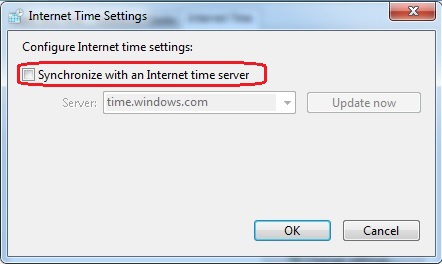
有WES7裡如果要設定上述紅色圈圈是否要勾選,如果直接透過滑鼠點擊那當然沒問題。如果是直接想透過commands或registry做修改而有同樣的結果,也是可以做到,步驟如下:
1. 在registry的HKLM\System\CurrentControlSet\Services\W32Time\Parameters找Type這個REG_SZ
2. 如果要打勾,則將Type的值改成"NTP"; 如果不想打勾,則將Type的值改成"NoSync"。Registry的值一改整個設定就會跟著連動,無須開機,只需重新執行一次。
針對Widnows 10的開發者手冊,裡面有有最新的訓練課程教導如何透過在Windows 10製作專屬的UWP及開發其新的features,可以參考看看。
幾天前發表了Windows 10的what's new、get started and etc. (Developer for Windows 10),但沒有工具怎能開始寫一個專屬的Universal App呢?所以這邊就要介紹新一代的Visual Studio 2015,整合了開發環境,可以製作出在Windows, iOS and Android運行的應用程式。
各位開發者如果本身就是透過Visual Studio開發應用程式的,可以看一下VS2015的新功能,針對不同的開發者有不同的版本可以選擇,可以參考以下的link
隨著Windows 10的上市,針對Windows 10上的開發與應用想必然有些些微的變化,比如Universal App的誕生。只要符合Universal App此架構,就能運行以Windows 10為主的各個不同平台,x86和ARM也可。
這邊有一些連結,給開發者在寫code時提供了最基本的參考價值,讓開發者有一定的依據可以開發可以在Windows 10上運行的Apps。
The contents in below links are English(以下的連結內容都為英文)
What's New: https://dev.windows.com/en-us/getstarted/whats-new-windows-10/?Wt.mc_ic=dx_MVP5000213
Get Started: https://dev.windows.com/en-us/getstarted/?Wt.mc_ic=dx_MVP5000213
將Windows 7/8/8.1 apply到partition,可以透過google找到很多的方法。問題是如果將這些方法用在Windows 10上呢?也是否可行?這得實驗一下了
先製作應答文件(answer file),記錄著所需要的指令,可減少typing的時間,如下:
select disk 0
clean
convert gpt

筆者在做這一部分的實驗時,突然想到Windows 7的RDP的版本會隨著update而增加,從原本default 7.1可以上到8.1。那WES7呢?相信defaule還是一樣是7.1,如果要上到8.1得從MyOEM下載ISO file,當然中間還有一個8.0的版本,端看各位選擇如何。
在這列出所在連結跟一些截圖:
defaule RDC: 6.1.7601/RDP: 7.1
Remote Desktop Connection(RDC): 6.2.9200/Remote Desktop Protocol(RDP): 8.0, link
Remote Desktop Connection(RDC): 6.3.9600/Remote Desktop Protocol(RDP): 8.1, link

Here list some steps to do Windows 10 Wimboot. The step 1 show how to do a WinPE 6.0 environment in your pen drive. After it, show you the commands you should type for your Windows 10 Wimboot system.
1. Install WADK for Windows 10, link: https://msdn.microsoft.com/en-us/windows/hardware/dn913721.aspx#winWDK
After download, press “Keep” to save adksetup.exe.
Windows 10 即將在這個月的29號available(官方說法),而Windows 10的版本就不再多做贅述,透過估狗大神會找到很多的文章,我們這邊就單純的討論Windows 10 IoT。
Windows 10 IoT只是其七大阪本之一,內容又分Windows 10 Mobile IoT, Windows 10 Enterprise and Windows 10 Core IoT。Windows 10 Mobile IoT看其名稱就知道是for handheld devices專用;而Windows 10 Enterprise則是用在ATM, POS or digital signage, etc;而Windows 10 Core IoT是針對for ARM base的devices用的。Windows 10 Enterprse就是以前的Windows Embedded,在Windows 10時代已經全部改名成Windwos 10 Enterprise。
之前的Windows Embedded版本那麼多,是否每一個版本都可以無限上綱的升級成Windows 10?答案是否定的。
根據MS的FAQ所揭列,只有以下的版本是可以透過Windows update將OS升級成Windows 10:Windows 7 Pro/Ultimate FES, Windows Embedded 8.1 Pro。原因是因為這三個版本的product core是跟一般PC的是一樣,所以可以直接的升級。
那其他的就不行了,因為元件化的關係,即使是Windows Embedded 8.1 Industry Pro/Pro for retail如此不需花費功力就能安裝成功的OS都不能,表示MS一定是在將安裝弄簡單,但在功能上做些捨取,導致上述的兩個都不能直接upgrade到Windows 10,更遑論真正能元件化的OS如WES7/8、 底層是由元件所組合而成的POSRready 7/Windows Embedded 8 Indsutry了。
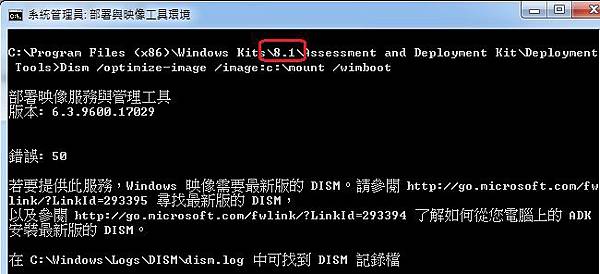
試著做Windows 10的wimboot,在reference device裡已經裝了Windows 8.1的WADK,透過其"Deployment and Imaging Tools Environment"試著要將已經mount的wim file進行/optimize-image的最佳化處理,卻發現一直出現Error: 50 ( 若要提供此服務,Windows 映像需要最新版的 DISM。請參閱 http://go.microsoft.com/fwlink/?LinkId=293395 尋找最新版的 DISM,以及參閱 http://go.microsoft.com/fwlink/?LinkId=293394 了解如何從您電腦上的 ADK安裝最新版的 DISM。)
但如果是製作Windows 8.1的wimboot,則不會有這個問題,於是在思考問題是不是WADK的版本不一樣所導致。經過測試後證實的確WADK版本不一樣導致,安裝WADK for Windows 10的版本就沒問題了。
P.S.: 試著把Windows 10 based的"Deployment and Imaging Tools Environment"對Windows 8.1的install.wim進行/Optimize-image,得到的結果一樣是不行,原因是DISM的version跟Image的version是不一樣,所以若要對哪個版本的install.wim進行/Optimize-image,得裝相對應的WADK才可。
